Horizontal extensibility allows metadata to be shared and inherited across Scenario Types, enabling the business processes to dictate application design. Within a cube, you can assign differing base members to each scenario type while sharing all relevant parent members. With horizontal extensibility, you can haveactuals, budgets, forecasts, long-range plans, and detailed data sets within the same cube and incorperate their proper level of input into the model.
This model is designed to prevent these common obstacles:
-
Dummy input members to key/load data at different levels in a hierarchy.
-
Separate cubes or disparate systems with slight variations of the same hierarchies.
-
Multiple versions of the same common reports.
-
Duplicate data residing in multiple tools to facilitate the separate needs of each process.
-
Inconsistent data tie out points across systems.
If applied properly, horizontal extensibility can:
-
Reduce technical debt by incorporating many fragmented processes.
-
Encourage adoption by meeting users where they operate.
-
Facilitate reporting and reduce data movement and maintenance.
-
Provide a single source of truth.
Through horizontal extensibility in OneStream, you can create a single common set of metadata with input levels that can follow each distinct process need An example of this function is a budget or forecast that is completed at a more summary level than the actual financial data. In the CPM Blueprint application, the Account dimension contains this type of extension. Net Revenue is the base input member for budgeting and forecasting in this application, while actuals are captured at a lower granularity.
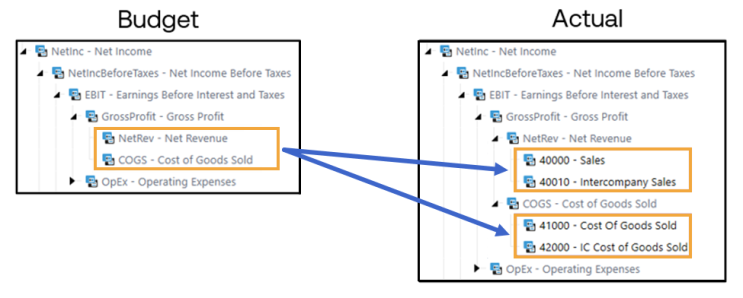
This example is within the Account dimension, but you can apply this concept across multiple OneStream dimensions. In the CPM Blueprint application, this type of horizontal extensibility is used in the LongTerm Scenario Type, because the application's long-range planning process takes place at a summary level. Like budgeting and forecasting, the account input is at the Net Revenue level. In the LongTerm Scenario Type, input into the Geography and Product dimensions vary from actual, budget, and forecast.

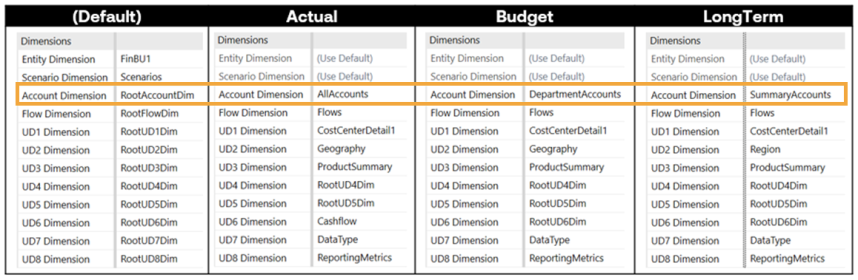
Horizontal extensibility allows this variability when designing scenarios, cubes, and global applications. Using horizontal extensibility across Scenario Types allows you to create a targeted user experience by adding or removing members and entire dimensions from scenario types where they are not valid. The examples above display processes occurring at different levels in the same hierarchies. Horizontal extensibility also creates flexibility when an entire dimension is not valid. The CPM Blueprint application’s CashFlow dimension is assigned to the Actual scenario type, meaning all Cash Flow members are included and valid in scenarios created with that Scenario Type. In the active planning scenario types, Budget, Forecast, and LongTerm, the Root dimension is assigned on the cube properties because only the None member is valid.
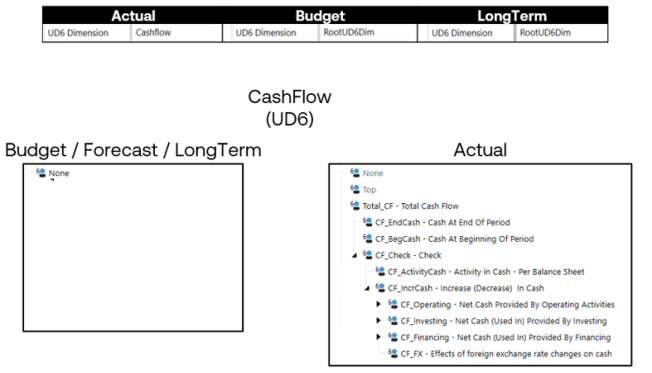
This targeted cube organization reduces confusion and limits potential data unit explosion caused by rogue rules, imported zeros, or other configuration issues. If invalid intersections are calculated because a business rule or member formula included Base, a zero could be stored in all those intersections that slows performance, causing the data unit expands exponentially as a result. Business rules without proper filtering and removal of zeros can potentially assess or write to significantly more intersections than intended. Configuring cube dimensions correctly by assigning the Root dimension for those that are inactive on a scenario type will allow addition and updates of new dimensions in the future. See Cube Dimensions
Implementing Horizontal Extensibility
The implementation of horizontal extensibility follows three main steps:
-
Planning and preparation
-
Configuration
-
Cube assignment
Planning and Preparation
The following example process demonstrates a recommended planning exercise that streamlines extensibility implementation. Start with a list of scenario types and data sets planned for incorporation into OneStream. Next, list out the various reporting dimensions used in each process and data set. Finally, create a grid with processes in columns and dimensions in rows. Fill in each valid intersection.
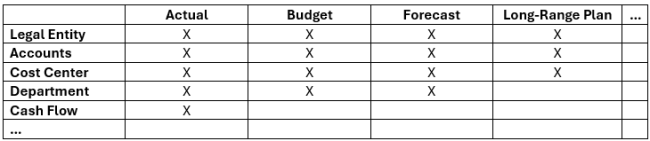
This chart visualizes that actuals and long-range planning should utilize separate Scenario Types to vary the inclusion and exclusion of entire dimensions. Next, build a chart that provides clarity for the differences between shared dimensions. As determined from the previous chart, all four processes need accounts. To determine which accounts are needed, compile a list of all possible members and hierarchies and repeat the process to identify where they should be valid.
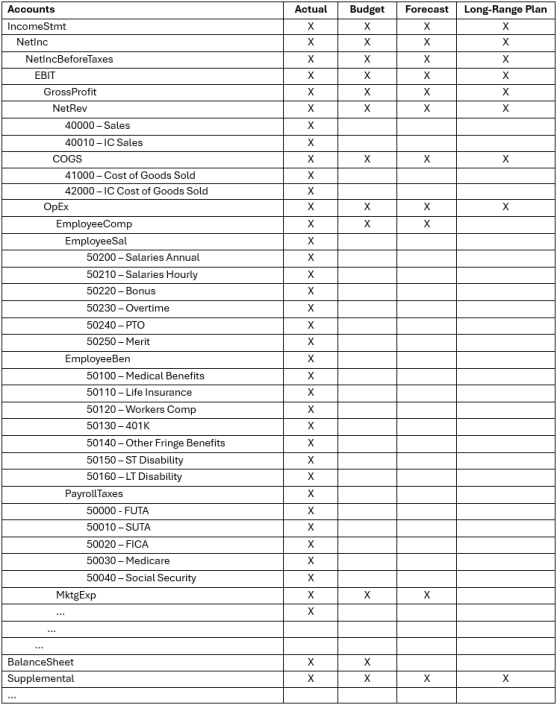
After this exercise is completed for accounts, repeat it for each reporting dimension identified to fully understand each data set. Decisions about setup should be made based on the account-level breakdown between the four different processes. Consider possible extension points in each dimension to set the foundation for future growth in the platform.
Configuration
After making decisions about potential horizontal extensibility, you can configure the dimensions and identify any issues with the extension points. When creating a summary dimension at the highest identified level in the member structure, the extended dimensions utilize the Inherited Dimension property on creation.

Inherited members are grey in the created dimension. You can begin adding the extended members, in most cases extending only from base members. In consolidating data between linked cubes, extending from parent members prevents the data from consolidating from sub cube to parent cube.
NOTE: Entity dimension does not follow this restriction.
The following example displays two example account extensions. Example A does not follow the recommendation to extend from base members, while example B does follow the recommendation.
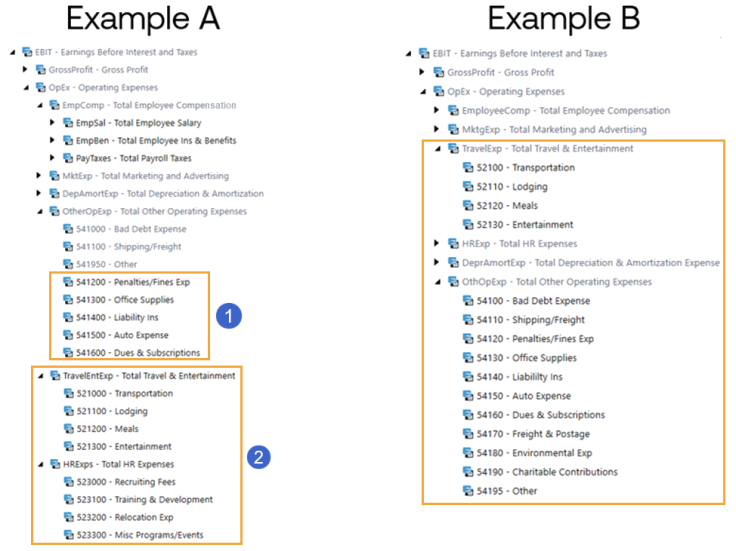
Two issues are identified in Example A:
-
Five base accounts are extended from the parent OtherOpExp.
-
The black and gray text in the account dimension library makes this difference visible. Accounts 541000, 541100, and 541950 are in gray text, signifying they are inherited from the parent dimension, while the five base accounts from 541200-541600 are in black text, signifying they were created in the currently selected dimension. This is an example of extending from a parent member, which will not consolidate correctly across linked cubes. These solutions are commonly used to resolve this configuration issue:
-
All the base members under OtherOpExp are included in the parent dimension and then inherited into the extended dimension. Input in the parent dimension would be to 541950-Other or one of the other base members.
-
Only the member OtherOpExp is included in the parent dimension and all child accounts are included in the extended dimension. Input in the parent dimension would be aggregated to the OtherOpEx level without the breakout of 541, 541100, and 541950.
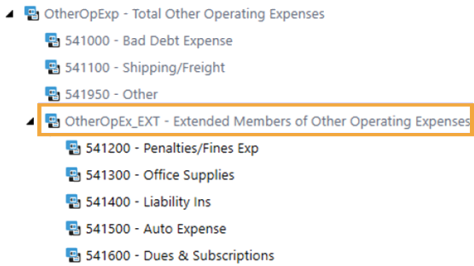
You can create a new parent member to extend from in the summary dimension. While this solution facilitates the desired split of base members between dimensions, it may cause confusion when viewing the hierarchy.
-
-
-
The parent accounts TravelEntExp and HRExps are extended from the parent account OpEx.
-
Even though the base members do not have siblings in the inherited dimension, the parents cannot have siblings in the inherited dimension either. All members in the extended dimension, both parent and base, should be extended from a base member.
-
Example B shows the common solution for this configuration with the Travel and HR expense parents included in the parent dimension and all base members in the extended dimension. A similar approach with the _Ext parent member could be applied here as well.
Consider future state goals when discussing extension points and deciding whether to move members up and down a dimension or add _EXT parent members to apply extensibility properly. For example, if the summary dimension you are creating is for facilitation of the forecast process, but the process does not include details around travel and HR expenses, ask if it will in the future. Consider creating a road map to expand your planning capabilities in these areas. Moving parent members between dimensions later can be accommodated, but moving base members is more difficult.
The recommended practice is extension from a base member, but extending from parent members is acceptable in these situations:
-
If consolidation of data up the linked cube structure is not intended
-
If there is no linkage between cubes and the intent is limitation of members visible to end users
-
If it is in the entity dimension
Though the example is of the Account dimensions, this also applies to Flow dimensions and User Defined dimensions.
Cube Assignment
Assign account dimensions to a cube after designing and creating them extensibly. Utilizing the flexibility provided by horizontal extensibility is dependent on proper cube dimension assignment. Non-data unit dimensions, Account, Flow, and UD1-UD8, should be applied in the specific Scenario Types in use. Any unused dimension in those active Scenario Types should be assigned to the Root dimension, for example, RootUD4D. Assigning the Root dimension instead of leaving each dimension type set to (Use Default) enables changes to that dimensional assignment later and activation for data input in the future. You can only update from the Root dimension to a specific dimension once. Changing from a Root dimension is a one-time change that cannot be reverted if there is data in the cube and Scenario Type combination.
Recommendations
Horizontal extensibility relates more to providing flexibility and data model integrity than managing data unit sizes. It can shrink the potential data unit size and mitigate the impact of a rogue calculation, but its focus is on creating a single source of truth by allowing for a single set of master metadata. When planning for extensibility, be mindful of future expansion. Consider what levels other parts of the business report or plan at and if there is any defined need for extensibility that you can capture now to facilitate future adoption.
Parent members can be moved between dimensions since there is no data stored in the database at that level, but base members cannot change dimensions. Consider incorporating plans to include certain members or hierarchies in a data set from the beginning. With proper configuration, horizontal extensibility can be utilized in Cube Views, Parameters, and Business Rules to drive standardization.
Member Filter Expansions
Applying extensibility and utilizing the provided member filter expansions can allow use of the same row and column set across varying scenario types in OneStream. If the business has a standard Income Statement where the only difference between processes is the level of detail, you can create it as a single report and share it across workflows. Two important member expansion functions are .Where() and .Options().
-
.Where(MemberDim = Value)
Example: A#60000.Base.Where(MemberDim = |WFAccountDim|)
_815x137.png)
-
.Options(Cube = CubeName, ScenarioType = Type, MergeMembersFromReferencedCubes = Boolean)
-
Targeting a specific extension point:
Example: A#19999.Base.Options(Cube = [Total GolfStream], ScenarioType = Actual, MergeMembersFromReferencedCubes = False)
-
In combination with XFMemberProperty() to create a more dynamic member formula:
Example: A#60000.TreeDescendantsInclusive.Options(Cube = |WFCube|, ScenarioType = XFMemberProperty(DimType = Scenario, Member = |WFScenario|, Property = ScenarioType), MergeMembersFromReferencedCubes = False)
-
Calculations
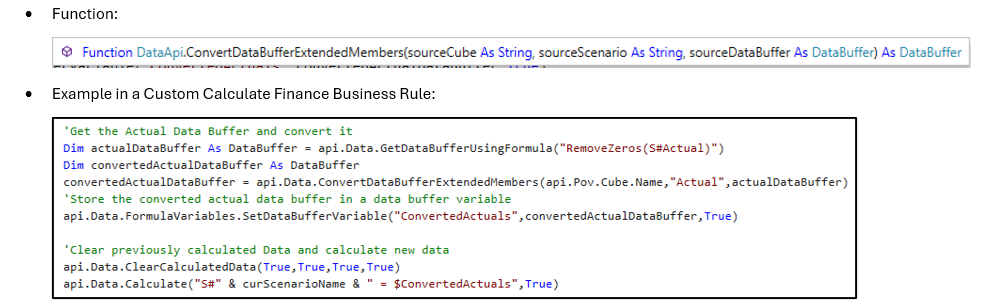
Consider the .Where() and .Options() member expansion functions when writing calculations across the platform. They are necessary at times to make calculations more targeted, and they can make them more dynamic. Another consideration is the function api.Data.ConvertDataBufferExtendedmembers when copying data across extended dimensions. Copying actual data into a forecast is frequently necessary. This function is a performant way to do so while accounting for extensibility. The ConvertDataBufferExtendedMembers function aggregates the data from extended members in the source data unit to the base level of the target data unit. After aggregating the data in memory, it can then be manipulated or stored using the target dimensionality.
Application and Results
When applying horizontal extensibility, it is important to remember that it is not applied to a single hierarchy. Consider all alternative hierarchies and incorporate extensibility there as well. Keep in mind how certain extension points in one dimension could impact its use in another dimension.
Example: Excluding balance sheet accounts from a forecast could impact the ability to make use of a Cash Flow dimension and corresponding calculations.


